


{{ post.title }}
글 편집
글 편집 (이전 에디터)
{{ post.author.name }}
Posted on
| Version | {{ post.target_version }} | Product |
{{ product.name }}
|
|---|---|---|---|
| Tutorial/Manual | {{ post.manual_title }} | Attached File | {{ post.file.upload_filename }} |
RecurDyn/Plot doesn't support the direct copy&paste of the curves.
Instead, you can utilize [Tool]-[Analysis]-[Math],
or you can export the curve data into a text (csv.) file and import it in other plot.
(https://support.functionbay.com/en/faq/single/233)
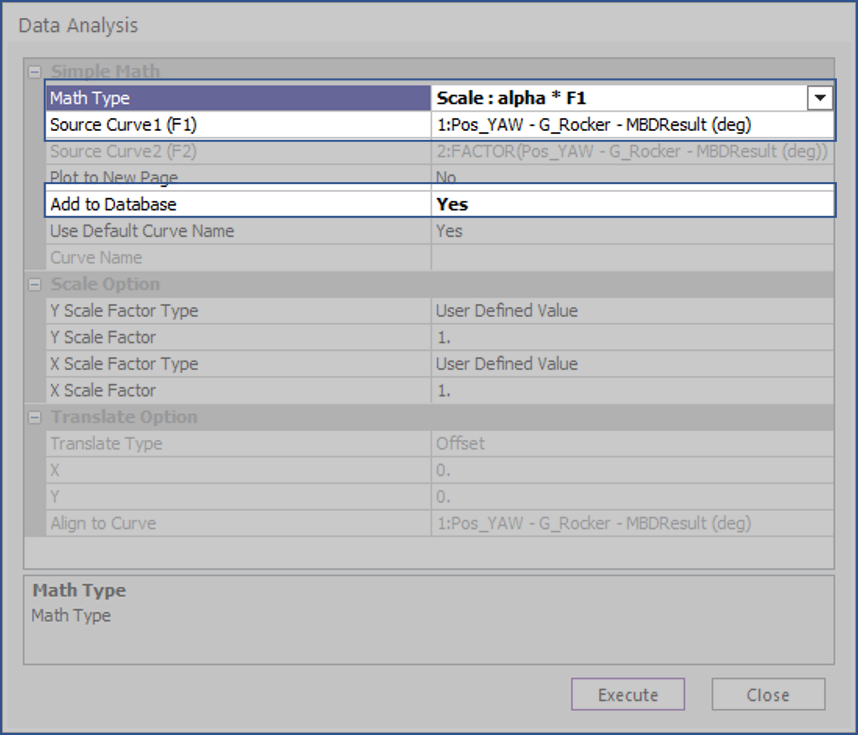
- Click [Math], then Data Analysis dialog box is open.

- After select the options as below,
- Math Type: Scale: alpha*F1
- Source Curve1: select the curve you want to copy
- Add to Database: YES
-
- Click Execute, then the same curve is drawn and it is added to the database.
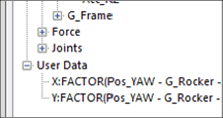
- You can draw the curve to other plot using this User Data.
